Typeform vs Google Forms: which form should you use?
5 min read
Last updated June 1, 2022. How we pick: we compare the job each tool is for, from public product pages, not a paid ranking.

If you're like most people, when you hear the word "form," you probably think of something boring, like a tax return or a doctor's registration assessment.
But forms can actually be fun!
And when it comes to online forms, there are two big players in the game: Typeform and Google Forms. So, which one should you use for your next project? Let's find out!
Typeform is a form creation tool that focuses on delivering beautiful, elegant forms. The goal behind that focus is to make forms more appealing — and lead more people to fill them out.
Google Forms, on the other hand, is a much more rigid and simplistic form creation tool. It makes form creation easy, accessible, and free with no nonsense.
That comparison alone may be enough to help you choose between the two. If you’re still on the fence, let’s break things down further to help you choose the best form tool for your needs.
Sponsored
Headwaze · $149/mo subscription · since 7 Oct 2026
Say hello to Typeform 👋
Typeform is a web based platform that makes collecting and sharing information comfortable and conversational, enabling users to create eye-catching and elegant forms that are a dream to fill in.
How To Use Typeform Tutorial 2022 (Step By Step):
An introduction to Google Forms
Google Forms is a form building platform that allows users to create surveys, and quizzes. The platform is part of Google's web-based apps suite which includes Google Docs, Google Sheets, Google Slides, and more.
It was built to be a versatile tool that can be used and integrated with various applications, from gathering RSVPs for an event to creating a pop quiz.
Getting started with Google Forms:
How to use Google Forms Beginners Tutorial:
Features and functionality
Google Forms was first created back in 2008, and was one of the first tools in the Google suite of applications to gather information through digital forms. Since the initial version of the platform there have been numerous updates and features added such as customised themes, plug-ins and uploads.
That said, it’s still pretty basic in terms of functionality.
Over the last decade, during a time of digital evolution, other tools which focus solely on form creation and distribution have hit the market - Typeform being one of them.
These rival platforms have really set the standard that Google Forms hasn’t quite lived up to just yet.
Nonetheless there are many great features available on both platforms, let’s discuss these more below…
1. Unlimited Forms
Typeform limits the number of forms and questions you can create on their free plan, but with any paid plan, this is limitless 🚀
In Google Forms you can build an unlimited number of forms from day dot and analyse each and every response.
2. Multiple Distribution Options
A good form building platform understands that the distribution options for sending out your survey and forms is just as important as the creation of them.
Both Typeform and Google Forms gives creators multiple options for distributing their forms to their required audience:
- Email your form to respondents
- Copy a link to share your form
- Embed your form on a web page
- Share your form on social media
3. Multiple question types
Both Typeform and Google Forms allow you to create multiple question types such as:
- Short answer
- Paragraph
- Multiple-choice
- Check boxes
- Linear scale
- Multiple choice grid
- Checkbox grid
You can also associate values with certain answers to provide a numerical outcome. In Google Forms, this is particularly useful for giving a score at the end of a quiz-style form – there is a feature where you can simply change the Google Form to a quiz and it will automatically grade scores for you. With Typeform, it’s an amazing way to provide quotes and pre-qualify leads.
4. Templates and customisation
Typeform also offers an array of templates that each have a unique and pleasing aesthetic. One of the best things about Typeforms templates is that they all look and feel high-end and as though they would cost a lot of money to make, when in fact Typeform is pretty inexpensive.
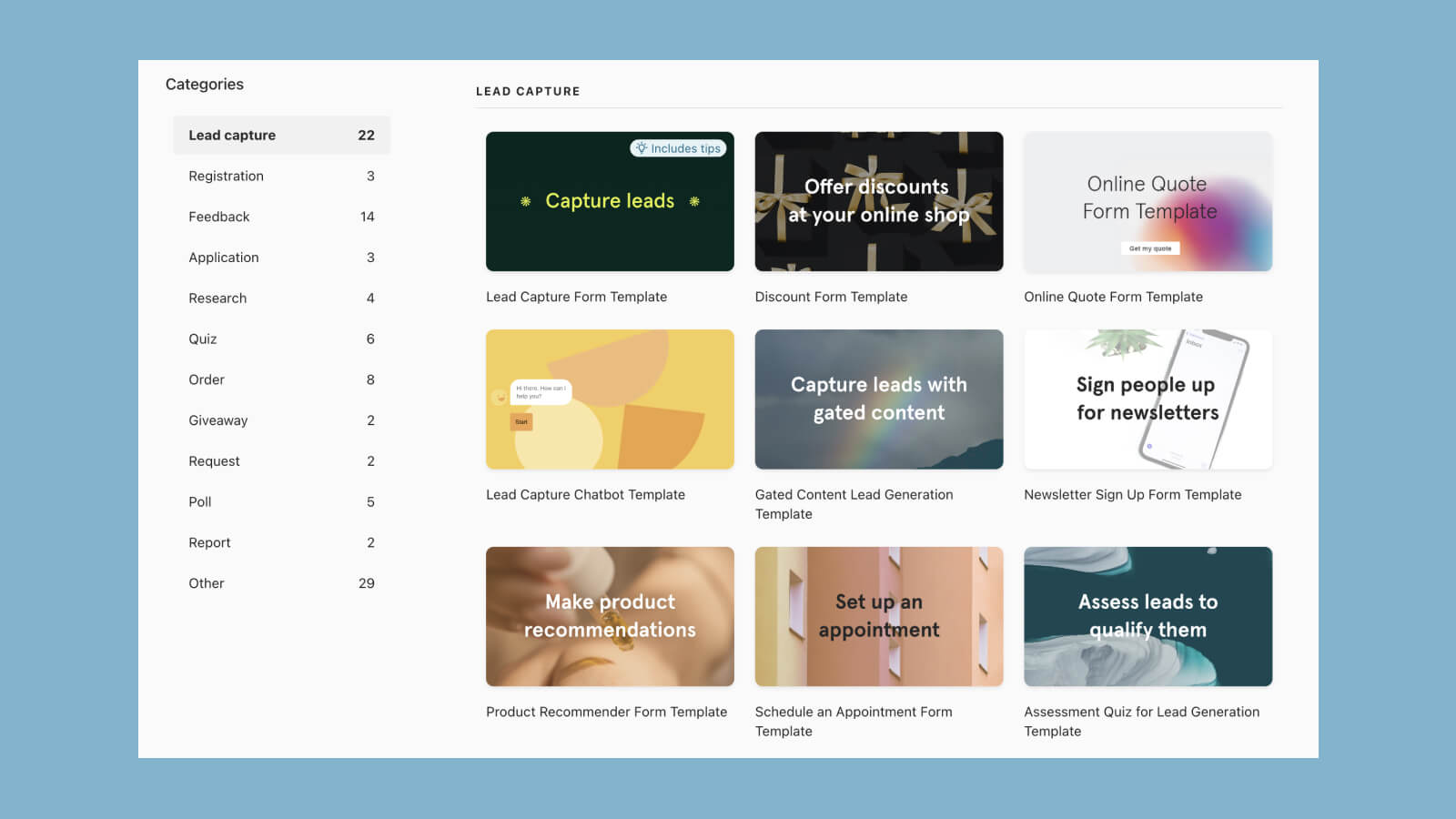
One of the biggest Google Forms drawbacks is that the types of forms you can build out are relatively limited. The platform is great for producing surveys and questionnaires to go out to the masses, and is designed for users to add a series of questions one after another. But it isn't the best tool for things such as creating applications, lead generation forms, payment forms, or a variety of other forms - all of which its competitors like Typeform can offer.
While Google Forms has a few templates to offer, the selection is not super extensive. Google Forms is really good for surveys and questionnaires but it isn’t the best tool for creating applications, lead generation forms, payment forms, or other types of forms..
5. File upload functionality
Allow respondents to upload documents or images through your Google Form or Typeform. This can be powerful for collecting job applications and requesting CVs or portfolios for all those pesky pdfs that aren’t digital yet.
6. Conditional logic (aka logic jump)
Allows respondents get served certain questions based on their responses to previous questions. For example, if a respondent chooses answer A, they will get served question 2 but if they choose answer B they will get jumped ahead to question 3.
Both Typeform and Google Forms offers logic but Google Forms’ version is extremely basic compared to the sophisticated conditional logic capabilities of Typeform. With Typeform, there are advanced branching features with hidden fields and other solutions you can take advantage of.
7. Payment gateways
A staple feature of Typeform is the ability to accept online payments through forms. Using custom ending screens and the calculator functionality, not only can you provide quotes or estimates, but you can actually ake payments for orders through Typeform.
Simply integrate a Typeform account with Stripe to get going.
This is not something that Google Forms offers.
Submit a tool if it belongs on the board. Listings are reviewed before they go live.
Share your learnings on socials